Logging in is not where the danger is
Let’s clear up the most useful point first. The act of signing in — entering an email or phone and a password — does not, by itself, transfer your money anywhere. So if you’ve logged in to look around, you haven’t “lost” anything by doing so. This matters because fear can push people into rushed decisions, and the calm truth is that the login screen is just a gate. The danger lives on the other side of it, in two specific places: the deposit button and the pressure to recruit others. Understanding that lets you use what you can see inside — without feeding the machine.
What the balance actually is
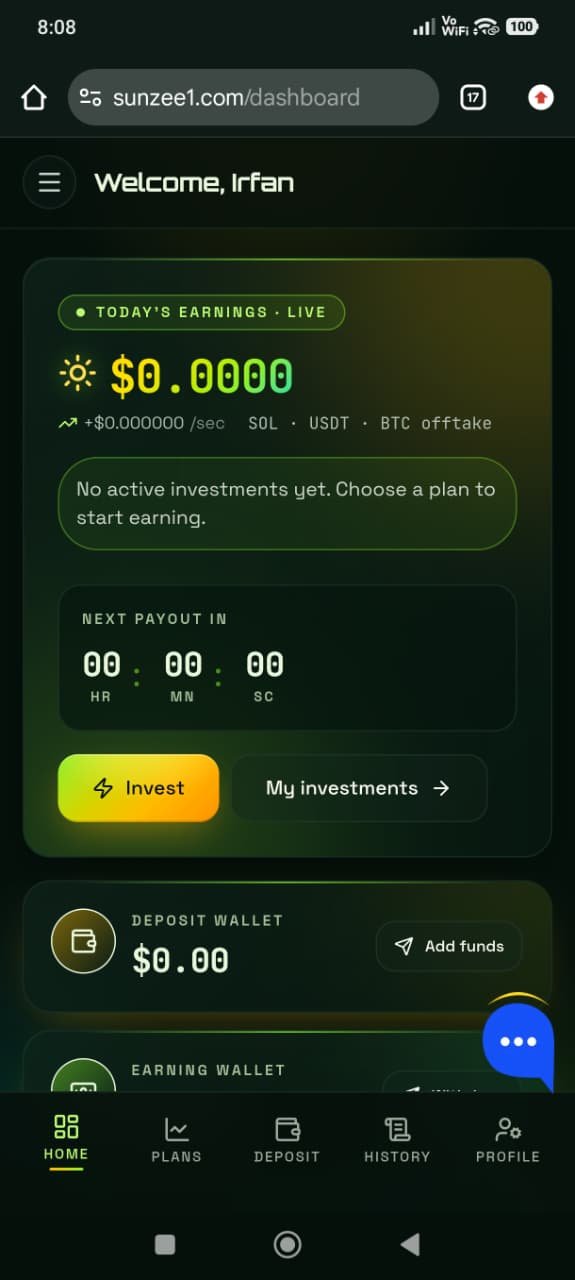
When you log in, the headline number — your “earnings,” your “balance” — feels like money you own. It isn’t. It’s a value stored in a database that the operator controls completely. They can make it climb by the hour to feel like income, tag parts of it “pending,” freeze it when you try to withdraw, or reset it. You have no independent ledger to dispute any of it. You never held that money; you were shown a number that represents a promise.
The only real money anywhere in Sunzee1 is the cash people actually deposited. Everything on your dashboard is marketing on top of that pool. Once you see the balance as a display value rather than a bank statement, the platform’s behaviour — generous-looking numbers, sudden withdrawal problems — stops being confusing and becomes predictable.
If you can log in but can’t withdraw
This is the most common and most revealing situation. You log in, you see a healthy balance, but a withdrawal won’t complete — it’s “pending,” or a message demands a “withdrawal tax,” “activation fee” or “clearance charge” paid up front before your money is released. Understand clearly: no legitimate platform ever requires you to deposit fresh money to withdraw your existing balance. The moment that’s asked, the answer is no, and it stays no however official or urgent the message sounds.
What’s happening is the trap springing. Small early withdrawals are often honoured to earn trust; larger ones are blocked behind fees that simply extract more money. Pay one fee and another appears — there is no final fee, only your money running out. The right move is to stop paying, capture evidence, and treat the balance as unrecoverable while you protect everything else. We walk through this in detail on the withdrawal-trap page.
If you suddenly can’t log in at all
A login that stops working — wrong-password loops, endless loading, or the whole site offline — is a classic sign that a scheme has collapsed or is “exit-scamming” (the operators taking the deposit pool and disappearing). Domains behind these apps are often very new and can vanish as quickly as they appeared. If this is you:
- Stop sending money immediately. Do not pay any “reactivation,” “unfreeze,” or “verification” fee to restore access — that’s a final squeeze, not a fix.
- Secure reused passwords. Change the password on your email, bank and wallet if you reused the one from this site.
- Save your evidence — screenshots of your account, deposits, and any support chats, before they’re gone for good.
- Report it to the FIA Cyber Crime Wing and warn anyone you referred.
Protecting your login and yourself
Even setting the scheme aside, basic account hygiene protects you from the wider fraud that surrounds apps like this:
- Never reuse passwords. If an anonymous platform’s database is leaked or sold, criminals will try your email-and-password combination on your important accounts. Use a unique password everywhere.
- Beware lookalike login pages. Scammers create phishing copies of popular “earning app” logins to steal credentials. Check the address carefully, and never enter a password after clicking a link in an unsolicited message.
- Never share OTPs or verification codes. No legitimate service asks you to read out a code sent to your phone. Anyone who does is trying to take over an account.
- Don’t enter bank or card passwords into the app. A dashboard has no honest reason to need your banking credentials.
So what should you actually do?
- If you haven’t deposited: don’t. Log out, and consider the account a curiosity that cost you nothing. Don’t recruit anyone.
- If you’ve deposited a little: try to withdraw whatever the platform will actually pay right now, immediately — and add nothing more.
- If you’re being asked for a fee to withdraw: stop, don’t pay, save evidence, and report.
- If you can’t log in / the site is down: secure passwords, save evidence, report, and warn others.
- In every case: ignore “bonus,” “VIP upgrade,” and “activation” prompts — they all lead back to depositing.
Why we treat the whole platform as unsafe
The login page is neutral; the platform behind it is not. Sunzee1 shows the full pattern of a high-yield investment scam: a guaranteed fixed hourly return that no real investment can promise, a deposit-first design built on irreversible payment rails, a five-level referral system that rewards recruiting recruits, an anonymous operator with no licence, and a brand-new, low-reputation domain flagged as high-risk by independent scanners. Any one of these would warrant caution. Together, they’re why our recommendation is simple: don’t deposit, and get your money and your data out of the ecosystem.
Reading the numbers on your dashboard
Once you understand that the balance is operator-controlled, the rest of the dashboard becomes easier to interpret honestly. The live earnings counter ticking upward isn’t a feed from any real business — it’s an animation designed to trigger the feeling of watching money grow, which makes withdrawing (and depositing more) feel urgent. The “team” or “referral” figures aren’t a measure of a thriving community; they’re a scoreboard encouraging you to recruit, because recruitment is what keeps the deposit pool topped up. The “plan” timers and lock-in periods exist to keep your money in place long enough for the scheme to use it and for you to become invested in believing. Every element is a persuasion device, not a financial instrument.
Seeing the dashboard this way is protective. The numbers are real as pixels and unreal as money. The moment you stop reading them as a bank statement and start reading them as marketing, their power to push you toward the deposit button fades.
What a real account gives you that this doesn’t
Contrast your Sunzee1 login with logging into a genuine, regulated financial account, and the gap is stark:
- A real balance is money held for you by a licensed institution, reconcilable and legally owed. A Sunzee1 balance is a number an anonymous operator can change at will.
- Real withdrawals follow stated terms and complete. Sunzee1 withdrawals work for small early amounts, then stall behind fees when the sum matters.
- Real accounts have accountable support tied to a named company and, ultimately, a regulator or ombudsman you can escalate to. Sunzee1 has none.
- Real platforms don’t pay you to recruit. A dashboard built around a referral engine is built around recruitment, not a product.
- Real rules are stable. Legitimate terms don’t suddenly change the moment your balance becomes worth withdrawing.
None of these protections exist behind the Sunzee1 login, which is why a healthy-looking balance there can’t be relied upon the way a bank balance can.
Common login problems and what they really mean
People search for the login for different reasons. Here’s how to read the most common situations:
- “Invalid credentials” right after signing up: often a simple error — but never reset a password by clicking a link in an unsolicited SMS or chat, which may be phishing. Go to the site directly.
- Login works, but withdrawals are “pending” forever: the trap stage. Don’t pay any fee to “speed up” or “release” funds.
- Login works, but you’re asked to “upgrade/verify” by depositing: the hook. Verification that requires new money is not verification, it’s extraction.
- Login suddenly fails for everyone / site is down: a strong sign of collapse or exit scam. Secure passwords, save evidence, report.
- You’re locked out and asked to pay to “recover” the account: a recovery scam layered on top. Never pay to regain access.
One more safeguard: your device and codes
Whatever you decide about the balance, lock down the things a scam ecosystem tends to reach for next. Enable two-factor authentication on your email and banking apps, so a leaked password alone can’t open them. Treat every one-time passcode as private — no legitimate service will ever ask you to read one aloud or forward it, and anyone who does is trying to hijack an account. Be wary of any message that arrives after you engage with an app like this, especially “security alerts” urging you to click a link and log in; open your accounts directly instead. These habits cost nothing and protect you far beyond this one platform, which is the point: the login itself may be harmless, but the fraud that clusters around it is not, and a few minutes of account hygiene closes the doors it relies on.
Sunzee1 login FAQ
Is the Sunzee1 login page safe to use?
Logging in by itself doesn’t take your money, so looking around after signing in isn’t the danger. The account belongs to a platform showing scam signals, and the balance you see is operator-controlled. The risk begins the moment you deposit — so don’t.
Why can I see earnings but not withdraw them?
Because the earnings are a display value, not money held for you. These schemes commonly pay small early withdrawals to build trust, then block larger ones behind fake fees. Paying a fee to “release” a withdrawal never works — it only adds a new loss.
The site won’t let me log in — did I get scammed?
A login that suddenly fails or a site that goes offline is a common sign of collapse or an exit scam. Don’t pay any fee to “restore access.” Secure reused passwords, save your evidence, report to the FIA Cyber Crime Wing, and warn anyone you referred.
Should I change my password?
Yes — especially if you reused it elsewhere. Set a unique password on your email, bank and wallet accounts. Also never share OTPs and never enter banking passwords into the app.